
X12 transaction guide · Planning
EDI 806 Project Schedule Reporting
The X12 document used to transmit project planning, scheduling and status information, from the initial plan to progress and changes.
- Sent by
- Contractor
- Received by
- Government agency or prime contractor
- Standard
- ANSI ASC X12
What is an EDI 806?
The EDI 806 Project Schedule Reporting is the ANSI X12 transaction set that provides for the transmission of planning, scheduling and status information. Its purpose is to establish an initial plan, report progress against the plan and report changes to it.
On large programs, the customer integrates contractors' schedules into an overall plan and tracks critical milestones. The 806 carries activities, dates, dependencies and progress, complementing the cost data sent with the 839. Updates are usually sent each reporting period.
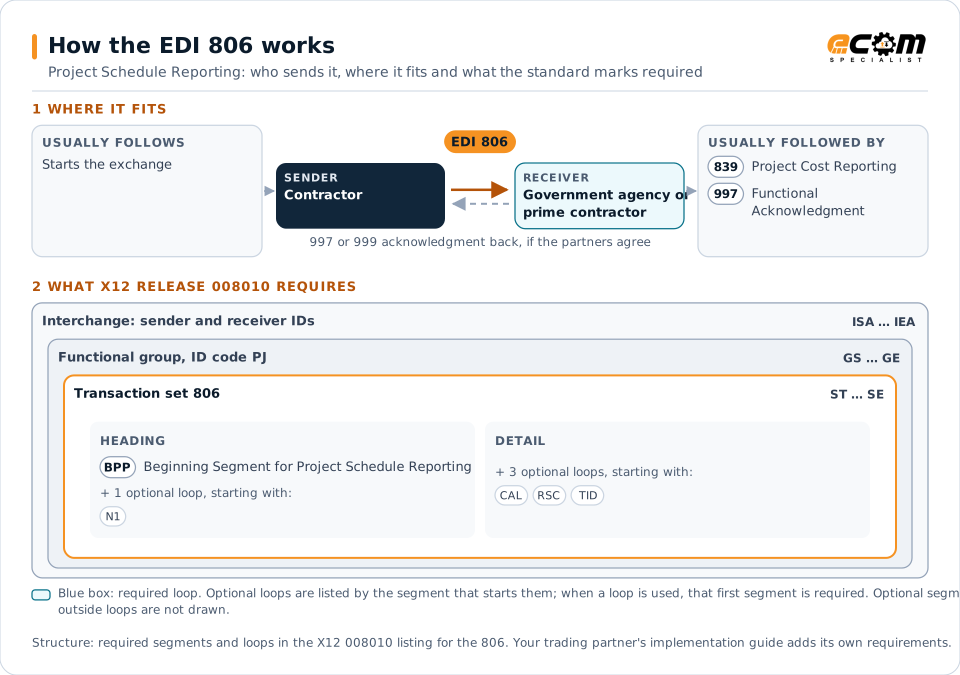
How to read this diagram: the top row shows who sends the 806, to whom, and which documents usually come before and after it. The lower part shows what X12 release 008010 itself requires: the envelopes around the 806 and the segments and loops the standard marks as required, area by area. Optional loops are listed by the segment that starts them rather than drawn in full. This is the standard's minimum, not a trading partner's requirement: each partner's implementation guide usually makes some optional loops mandatory, restricts the codes and may use a different release.
When it is used
- Submitting a baseline schedule
- Reporting progress against the schedule
- Reporting schedule changes
Where it fits in the document flow
Structure
Mandatory segments in the 806 (X12 release 008010)
The segments X12 release 008010 marks as mandatory at their level, in order. Segments inside optional loops are needed only when the loop is used. This is the standard's requirement, not your trading partner's: each partner's implementation guide names the release it uses, adds the optional segments it requires and restricts the values. The requirement status comes from one published X12 reference listing and has not been checked against a second source.
- ST
- BPP
- N1
- CAL
- RSC
- TID
- MTX
- MLS
- SE
Practical example
The 806 in practice
A shipbuilder reports its construction schedule to the navy program office. It sends an initial 806 with all activities and milestones, then monthly updates with actual dates, percent complete and revised forecasts. The program office identifies milestones at risk and discusses them at reviews.
Implementation
Implementation considerations for the 806
- Keep activity identifiers stable between updates.
- Report activity dependencies as well as dates.
- Align schedule and cost reporting structures.
- Explain significant changes to the plan.
How ECOM helps
Automate the 806 with ECOM
Industry
Industrial Manufacturing
Distributor, OEM customer and supplier integration for industrial manufacturers.
Solution
Supply Chain Visibility
Track orders, shipments and invoices across partners and catch exceptions early.
Solution
Enterprise Integration
Any-to-any integration across partners, systems, protocols, security requirements, formats and ERPs, in batch or real time.
More general questions about EDI are answered in the EDI FAQ.
Related transactions
Related planning documents
Need help with the EDI 806?
ECOM maps, tests and monitors X12 documents for your trading partners and integrates them with your ERP.