
X12 transaction guide · Transportation
EDI 422 Equipment Order
The X12 document a rail carrier or shipper uses to order the equipment it needs for transportation.
- Sent by
- Shipper or rail carrier
- Received by
- Rail carrier or equipment provider
- Standard
- ANSI ASC X12
What is an EDI 422?
The EDI 422 Equipment Order is the ANSI X12 transaction set that allows a rail carrier or shipper to order the equipment it needs for its transportation requirements.
Shippers order empty cars of the right type, such as covered hoppers or boxcars, for the days they plan to load. Railroads use the orders to distribute empty cars across their networks. Ordering electronically makes demand visible earlier and lets the railroad confirm or adjust supply. Orders can be changed or cancelled as plans change.
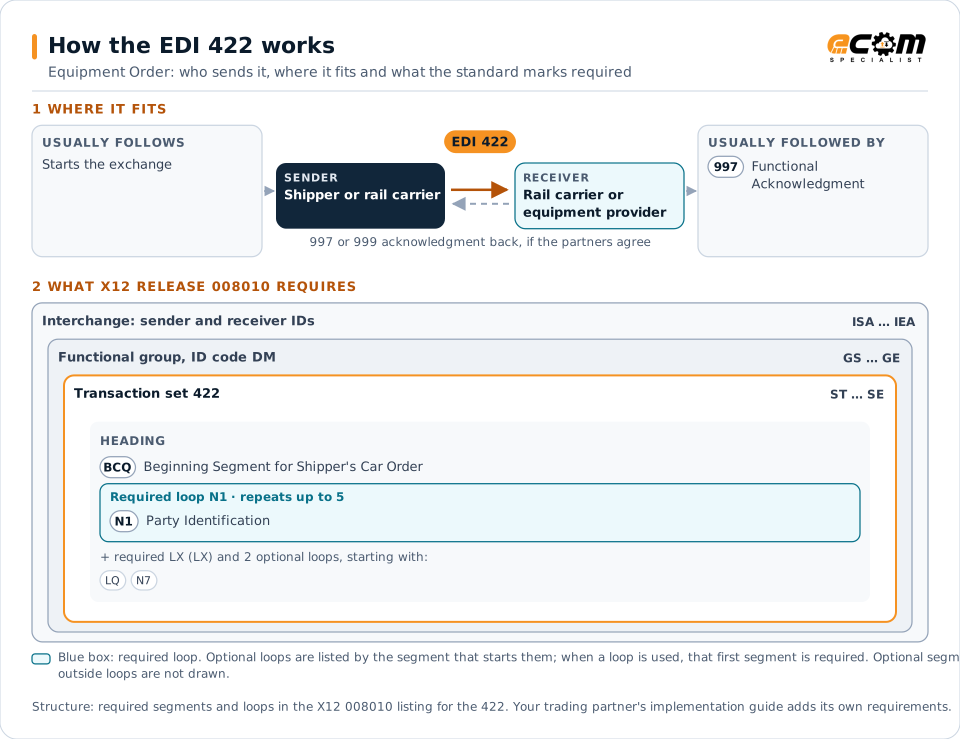
How to read this diagram: the top row shows who sends the 422, to whom, and which documents usually come before and after it. The lower part shows what X12 release 008010 itself requires: the envelopes around the 422 and the segments and loops the standard marks as required, area by area. Optional loops are listed by the segment that starts them rather than drawn in full. This is the standard's minimum, not a trading partner's requirement: each partner's implementation guide usually makes some optional loops mandatory, restricts the codes and may use a different release.
When it is used
- Ordering empty cars for loading
- Specifying car type and quantities by date
- Ordering equipment between carriers
Where it fits in the document flow
Structure
Mandatory segments in the 422 (X12 release 008010)
The segments X12 release 008010 marks as mandatory at their level, in order. Segments inside optional loops are needed only when the loop is used. This is the standard's requirement, not your trading partner's: each partner's implementation guide names the release it uses, adds the optional segments it requires and restricts the values. The requirement status comes from one published X12 reference listing and has not been checked against a second source.
- ST
- BCQ
- N1
- LX
- F9
- SCR
- DTM
- LQ
- N7
- SE
Practical example
The 422 in practice
A plastics producer plans to load 15 covered hoppers next week. Its logistics system sends the railroad a 422 ordering the cars by type, quantity and placement date at its plant siding. The railroad allocates cars from its empty fleet and places them on the requested days.
Implementation
Implementation considerations for the 422
- Order cars with enough lead time for distribution.
- Specify car types and features precisely.
- Track actual car placements against the orders.
- Cancel orders that are no longer needed.
How ECOM helps
Automate the 422 with ECOM
Industry
Trucking and Transportation
Load tenders, responses, status and freight invoices for carriers, brokers and shippers, integrated with the TMS.
Industry
Manufacturing
Customer schedules, supplier connectivity and shipping integrated with the ERP for manufacturers.
Solution
Logistics Automation
Automate tenders, status updates, freight invoices and warehouse orders with logistics partners.
More general questions about EDI are answered in the EDI FAQ.
Related transactions
Related transportation documents
- 106Motor Carrier Rate Proposal
- 108Response to a Motor Carrier Rate Proposal
- 211Motor Carrier Bill of Lading
- 216Motor Carrier Shipment Pickup Notification
- 227Trailer Usage Report
- 404Rail Carrier Shipment Information
- 120Vehicle Shipping Order
- 127Vehicle Baying Order
- 160Transportation Automatic Equipment Identification
- 228Equipment Inspection Report
- 317Delivery/Pickup Order
- 352Customs Carrier General Order Status
Need help with the EDI 422?
ECOM maps, tests and monitors X12 documents for your trading partners and integrates them with your ERP.