
X12 transaction guide · Transportation
EDI 222 Cartage Work Assignment
The X12 document that gives a cartage carrier the placement, rating and scheduling information for moving equipment such as containers or trailers.
- Sent by
- Railroad, ocean carrier, steamship agent or shipper
- Received by
- Cartage (drayage) carrier
- Standard
- ANSI ASC X12
What is an EDI 222?
The EDI 222 Cartage Work Assignment is the ANSI X12 transaction set that gives a cartage carrier the placement, rating and scheduling information for moving equipment. Cartage, or drayage, is the short-haul movement of containers and trailers between ramps, terminals, ports and customer facilities.
The 222 tells the drayage company which equipment to move, from where to where, when, and how the move is rated. The cartage carrier accepts or declines it with a 225 response. It is widely used in intermodal rail and port operations, where equipment must move between terminals and customers on tight schedules.
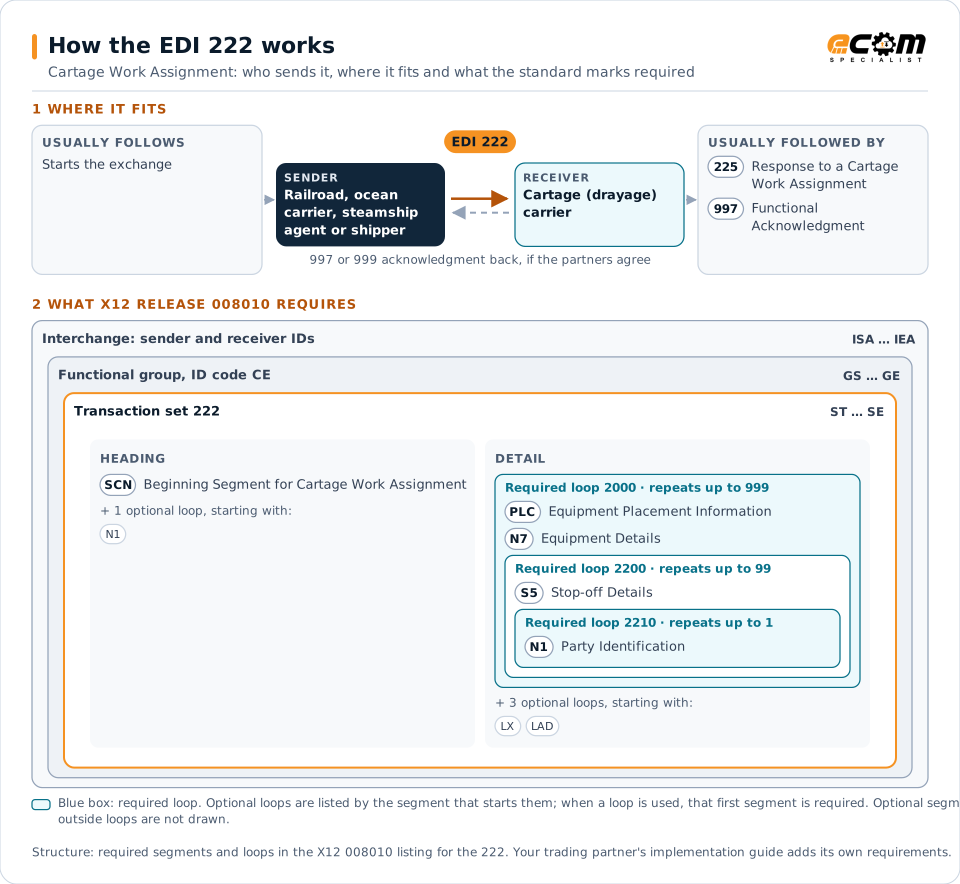
How to read this diagram: the top row shows who sends the 222, to whom, and which documents usually come before and after it. The lower part shows what X12 release 008010 itself requires: the envelopes around the 222 and the segments and loops the standard marks as required, area by area. Optional loops are listed by the segment that starts them rather than drawn in full. This is the standard's minimum, not a trading partner's requirement: each partner's implementation guide usually makes some optional loops mandatory, restricts the codes and may use a different release.
When it is used
- Assigning container or trailer moves to a drayage carrier
- Scheduling deliveries from a rail ramp or port to a customer
- Arranging empty equipment repositioning
Where it fits in the document flow
Structure
Mandatory segments in the 222 (X12 release 008010)
The segments X12 release 008010 marks as mandatory at their level, in order. Segments inside optional loops are needed only when the loop is used. This is the standard's requirement, not your trading partner's: each partner's implementation guide names the release it uses, adds the optional segments it requires and restricts the values. The requirement status comes from one published X12 reference listing and has not been checked against a second source.
- ST
- SCN
- N1
- PLC
- N7
- LX
- AT3
- S5
- LAD
- G61
- LH1
- SE
Practical example
The 222 in practice
An intermodal container arrives at a rail ramp outside Chicago for delivery to a distribution center. The intermodal marketing company sends its drayage partner a 222 with the container number, the ramp, the delivery address and appointment window, and the agreed rate. The drayage company accepts with a 225 and schedules a driver.
Implementation
Implementation considerations for the 222
- Include equipment numbers, appointment windows and last free day where relevant.
- Match each assignment to a response, and follow up on declined moves quickly.
- Track demurrage and detention exposure tied to the assignment dates.
- Keep rates consistent with the drayage invoices that follow.
How ECOM helps
Automate the 222 with ECOM
Industry
Trucking and Transportation
Load tenders, responses, status and freight invoices for carriers, brokers and shippers, integrated with the TMS.
Solution
Logistics Automation
Automate tenders, status updates, freight invoices and warehouse orders with logistics partners.
Industry
3PL and Warehousing
Warehouse orders, shipping advice, receipts and inventory reporting between brands, 3PLs, carriers and retailers.
More general questions about EDI are answered in the EDI FAQ.
Related transactions
Related transportation documents
- 225Response to a Cartage Work Assignment
- 215Motor Carrier Pickup Manifest
- 219Logistics Service Request
- 220Logistics Service Response
- 300Reservation (Booking Request) (Ocean)
- 301Confirmation (Ocean)
- 303Booking Cancellation (Ocean)
- 304Shipping Instructions
- 313Shipment Status Inquiry (Ocean)
- 317Delivery/Pickup Order
- 319Terminal Information
- 322Terminal Operations and Intermodal Ramp Activity
Need help with the EDI 222?
ECOM maps, tests and monitors X12 documents for your trading partners and integrates them with your ERP.