
X12 transaction guide · Government and regulatory
EDI 175 Court and Law Enforcement Notice
The X12 document used to notify interested parties of important court events and actions in a case, or of law enforcement information.
- Sent by
- Court or law enforcement agency
- Received by
- Interested parties, such as creditors or their attorneys
- Standard
- ANSI ASC X12
What is an EDI 175?
The EDI 175 Court and Law Enforcement Notice is the ANSI X12 transaction set used to notify interested parties about important court events and actions related to a specific court case. It may also be used to transmit information about a law enforcement matter.
A common use is bankruptcy noticing: creditors receive notices of filings, meetings of creditors, deadlines and discharges for debtors who owe them money. Receiving notices electronically lets creditors update accounts and stop collection activity promptly, as the law requires.
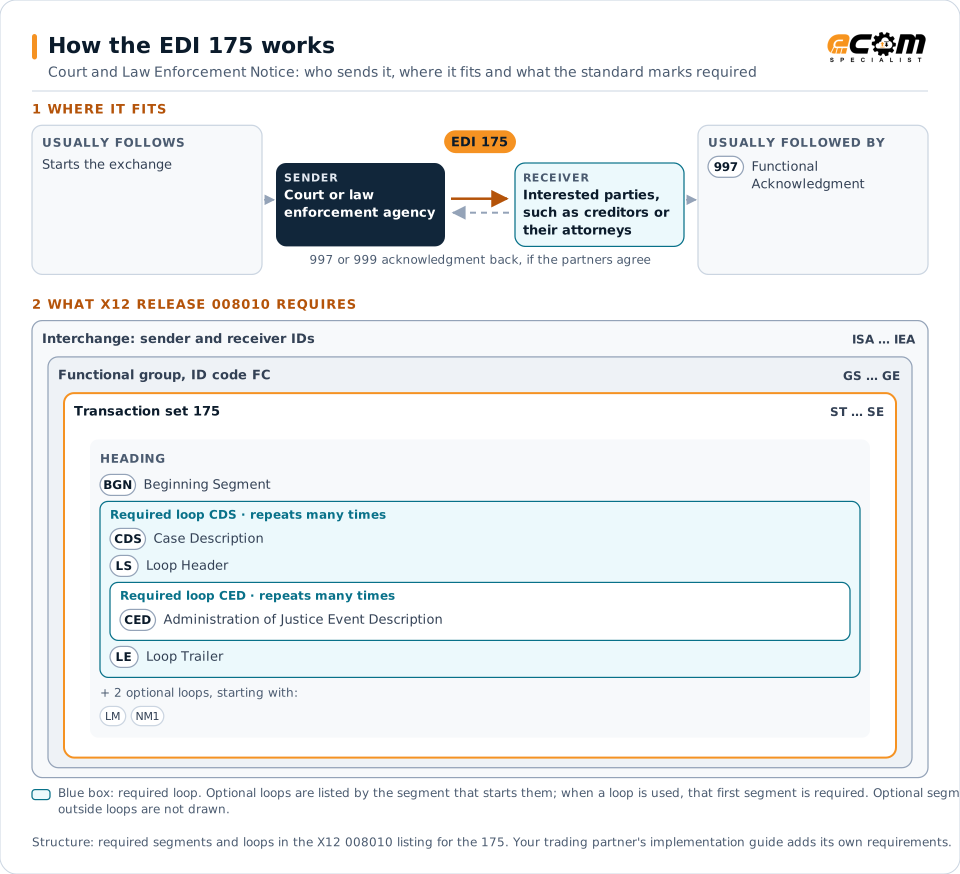
How to read this diagram: the top row shows who sends the 175, to whom, and which documents usually come before and after it. The lower part shows what X12 release 008010 itself requires: the envelopes around the 175 and the segments and loops the standard marks as required, area by area. Optional loops are listed by the segment that starts them rather than drawn in full. This is the standard's minimum, not a trading partner's requirement: each partner's implementation guide usually makes some optional loops mandatory, restricts the codes and may use a different release.
When it is used
- Notifying creditors of bankruptcy filings
- Notifying parties of hearings and deadlines
- Reporting case outcomes such as discharges
Where it fits in the document flow
Structure
Mandatory segments in the 175 (X12 release 008010)
The segments X12 release 008010 marks as mandatory at their level, in order. Segments inside optional loops are needed only when the loop is used. This is the standard's requirement, not your trading partner's: each partner's implementation guide names the release it uses, adds the optional segments it requires and restricts the values. The requirement status comes from one published X12 reference listing and has not been checked against a second source.
- ST
- BGN
- CDS
- LS
- CED
- LM
- LQ
- NM1
- LX
- LE
- SE
Practical example
The 175 in practice
A consumer files for bankruptcy and lists a credit card issuer as a creditor. The court's noticing system sends the issuer a 175 with the case number, the filing date and the deadline for claims. The issuer stops collection on the account and prepares its proof of claim.
Implementation
Implementation considerations for the 175
- Act promptly on notices with legal consequences.
- Match debtors to their accounts reliably.
- Track every deadline stated in the notices.
- Protect the personal data contained in court notices.
How ECOM helps
Automate the 175 with ECOM
Industry
Financial Services
Secure file transfer and B2B integration for banks and financial institutions.
Solution
EDI Integration
Exchange X12 and EDIFACT documents with partners and integrate them directly with your ERP.
Solution
Enterprise Integration
Any-to-any integration across partners, systems, protocols, security requirements, formats and ERPs, in batch or real time.
More general questions about EDI are answered in the EDI FAQ.
Related transactions
Related government and regulatory documents
Need help with the EDI 175?
ECOM maps, tests and monitors X12 documents for your trading partners and integrates them with your ERP.