
Guides

Epicor Prophet 21 EDI integration guide for distributors

How wholesale distributors connect Epicor Prophet 21 to EDI customers and suppliers, including drop-ship flows and price catalogs.

2 min read · Updated October 19, 2026

The short answer

Distributors on Epicor Prophet 21 trade EDI on two sides. Customer purchase orders become P21 orders, and P21 sends ship notices and invoices back. On the supplier side, P21 purchase orders go out, and acknowledgments, ship notices, invoices and price catalogs come in. An integration layer translates the documents and exchanges data with P21 through its APIs and import interfaces.

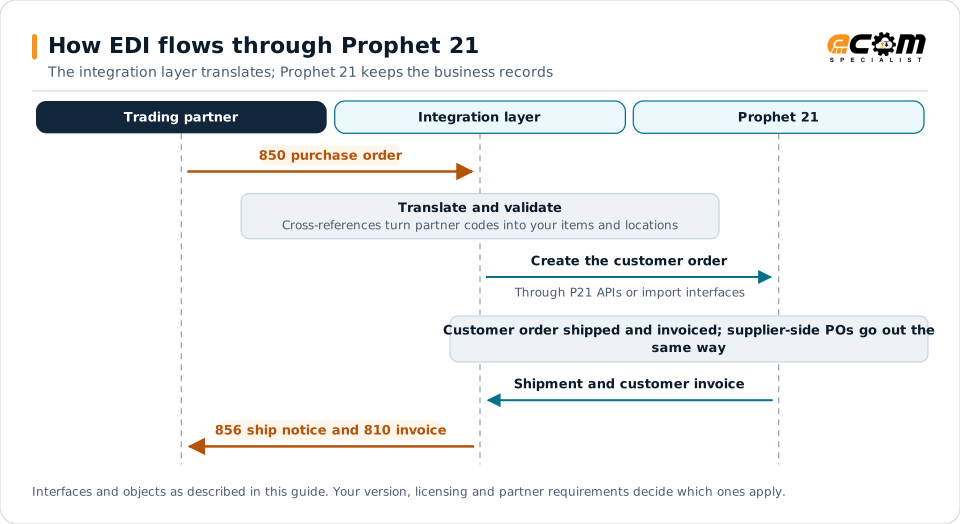
How EDI flows through Prophet 21Sequence diagram for Prophet 21. The trading partner sends a 850 purchase order to the integration layer, which translates and validates it and create the customer order through P21 APIs or import interfaces. In Prophet 21, customer order shipped and invoiced; supplier-side POs go out the same way. Shipment and customer invoice, and the integration layer sends the 856 ship notice and 810 invoice to the partner.How EDI flows through Prophet 21The integration layer translates; Prophet 21 keeps the business recordsTrading partnerIntegration layerProphet 21850 purchase orderTranslate and validateCross-references turn partner codes into your items and locationsCreate the customer orderThrough P21 APIs or import interfacesCustomer order shipped and invoiced; supplier-side POs go out thesame wayShipment and customer invoice856 ship notice and 810 invoiceInterfaces and objects as described in this guide. Your version, licensing and partner requirements decide which ones apply.
How EDI flows through Prophet 21Sequence diagram for Prophet 21. The trading partner sends a 850 purchase order to the integration layer, which translates and validates it and create the customer order through P21 APIs or import interfaces. In Prophet 21, customer order shipped and invoiced; supplier-side POs go out the same way. Shipment and customer invoice, and the integration layer sends the 856 ship notice and 810 invoice to the partner.How EDI flows through Prophet21The integration layer translates; Prophet 21keeps the business recordsTradingpartnerIntegrationlayerProphet 21850 purchase orderTranslate and validateCross-references turnpartner codes into youritems and locationsCreate the customer orderThrough P21 APIs or importinterfacesCustomer ordershipped and invoiced;supplier-side POs goout the same wayShipment and customerinvoice856 ship notice and 810invoiceInterfaces and objects as described in this guide.Your version, licensing and partner requirementsdecide which ones apply.

Read the diagram from top to bottom. Prophet 21 does not exchange X12 itself in this design: the integration layer handles the partner connection and translation, and Prophet 21 creates and posts the business records. Outbound documents are built from what Prophet 21 actually recorded.
Expand diagram Download SVG

How EDI connects to Prophet 21

Epicor Prophet 21 (P21) is built for wholesale distributors, who sit between many suppliers and many customers. That makes EDI two-sided: distributors receive orders from customers and send orders to suppliers, often for the same goods. An integration layer handles partner connectivity and translation and exchanges data with P21 through its APIs and import interfaces.

Customer-side documents

EDI documentDirectionP21 object
850 purchase orderInboundCustomer order
855 acknowledgmentOutboundOrder status and lines
856 ship noticeOutboundShipment
810 invoiceOutboundCustomer invoice

Supplier-side documents

EDI documentDirectionP21 object
850 purchase orderOutboundSupplier purchase order
855 acknowledgmentInboundPurchase order confirmation
856 ship noticeInboundExpected receipt
810 invoiceInboundSupplier invoice (accounts payable)
832 price/sales catalogInboundItem and cost updates

Drop-ship flows

In a drop-ship, the supplier ships directly to the distributor’s customer:

  1. The customer’s order creates a supplier purchase order.
  2. The supplier acknowledges and ships, sending a ship notice.
  3. P21 records the shipment and sends the customer a ship notice and invoice.
  4. The supplier’s invoice is matched to the purchase order.

Because each step depends on the previous one, monitor both sides of the order together. See drop-ship automation.

Integration options

  • P21 APIs for creating and reading transactions such as orders and invoices.
  • Import interfaces for file-based order and data imports.
  • Custom extensions for distribution-specific partner requirements.

Partner data

  • Customer part numbers mapped to P21 items.
  • Supplier item numbers and units of measure for outbound purchase orders.
  • Ship-to records for customer locations, including drop-ship addresses.

Best practices

  • Map units of measure carefully, since suppliers and customers often differ.
  • Review supplier catalog updates before they change costs or prices.
  • Match supplier ship notices and invoices to purchase orders automatically.
  • Monitor drop-ship orders end to end, from customer order to supplier invoice.
  • Prioritize the customers and suppliers with the most volume.
Epicor Prophet 21 integration and implementationIntegration methods, document mappings and ECOM services for Epicor Prophet 21.

Frequently asked questions

Why is EDI different for distributors?

Distributors trade with both customers and suppliers, often for the same order, as in drop-ship. They need inbound and outbound versions of most documents and must keep both sides synchronized.

How should drop-ship orders be handled?

The customer order creates a supplier purchase order, the supplier's ship notice confirms shipment, and P21 sends the customer a ship notice and invoice. Monitoring both sides together prevents gaps.

Can supplier price catalogs be automated?

Yes. Price and sales catalog documents from suppliers can update item and cost data after review, which keeps pricing current without manual entry.

Have an EDI question we did not answer?

ECOM's integration specialists can review your partners, documents and systems and recommend next steps.