
EDIFACT message guide · Healthcare and social
SOCADE Social administration
The UN/EDIFACT message an employer sends to an organization to report information about people who receive wages or benefits from it.
- Sent by
- Employer
- Received by
- Social security or administration organization
- Standard
- UN/EDIFACT · Batch message
- X12 equivalent
- No direct equivalent
What is the EDIFACT SOCADE message?
SOCADE is the UN/EDIFACT social administration message. The directory defines it as a message sent by an employer to an organization to report information about persons who receive wages or benefits from the employer. It can relate to an event concerning one or more persons.
Employers report hires, departures, wage changes and absences to social security, pension and similar organizations. Structured reporting replaces many separate forms and keeps the organizations' records accurate for contributions and benefits. National schemes define which events must be reported.
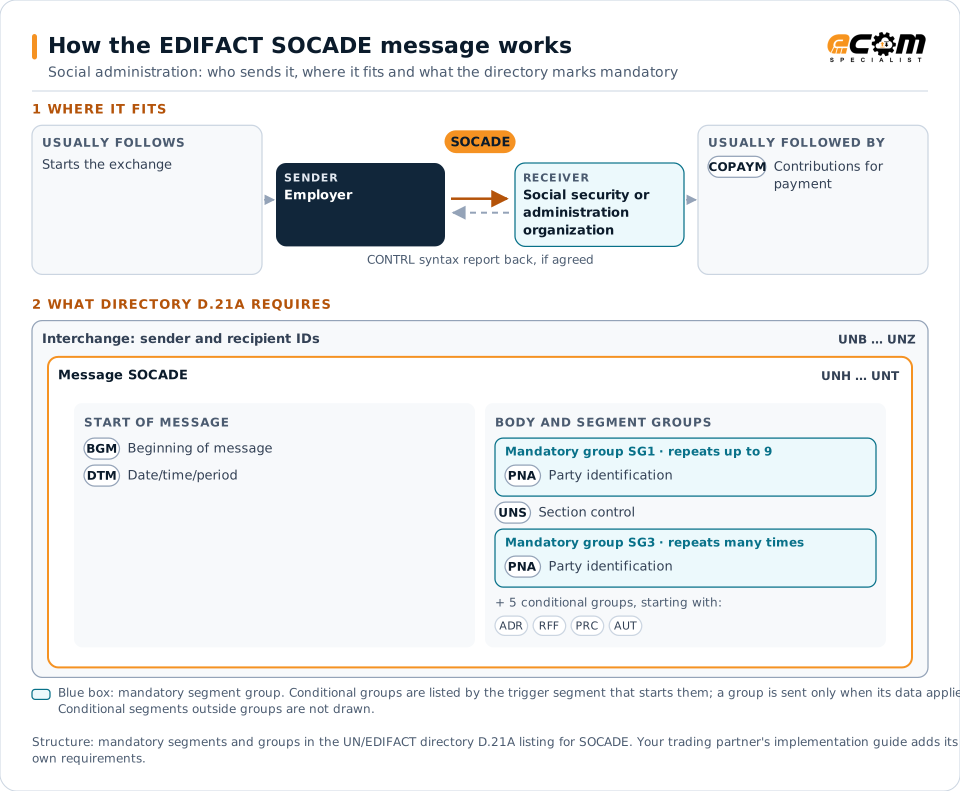
How to read this diagram: the top row shows who sends SOCADE, to whom, and which messages usually come before and after it. The lower part shows what the directory D.21A itself requires: the envelopes around SOCADE and the segments and segment groups it marks mandatory. Conditional groups are listed by their trigger segment rather than drawn in full. This is the directory's minimum, not a trading partner's requirement: a message implementation guide, such as an industry subset or a partner’s own guide, usually makes some conditional groups mandatory, restricts the codes and may use an older directory.
When it is used
- Reporting new hires and departures
- Reporting wages for contribution purposes
- Reporting absences such as sick leave
Where it fits in the message flow
Structure
Mandatory segments in SOCADE (directory D.21A)
In UN/EDIFACT directory D.21A, the SOCADE message has 53 segment positions arranged in 12 segment groups. These are the segments and segment groups marked mandatory at message level, in order; a mandatory group is shown with the segment that starts it. Segments inside conditional groups are needed only when the group is used. This is the directory’s requirement, not your trading partner’s: each partner’s message implementation guide names the directory it uses, often an older one such as D.96A or D.01B where the structure can differ, makes some conditional segments mandatory and restricts the codes.
- UNH
- BGM
- DTM
- SG1 (PNA)
- UNS
- SG3 (PNA)
- UNT
Practical example
SOCADE in practice
An employer hires 20 seasonal workers and reports the hires, contracts and wages to the social security organization with SOCADE messages. When the season ends, it reports the departures, and the organization updates each person's records.
Implementation
Implementation considerations for SOCADE
- Follow the receiving organization's specification.
- Report events within statutory deadlines.
- Protect employees' personal data under applicable law.
- Reconcile reported wages with payroll records.
How ECOM helps
Automate SOCADE with ECOM
Solution
Enterprise Integration
Any-to-any integration across partners, systems, protocols, security requirements, formats and ERPs, in batch or real time.
Solution
EDI Integration
Exchange X12 and EDIFACT documents with partners and integrate them directly with your ERP.
Industry
Healthcare
Secure B2B integration and file transfer for providers, suppliers, distributors and healthcare partners.
Compare X12 and EDIFACT, or see answers to general questions in the EDI FAQ.
Related messages
Related healthcare and social messages
- COPAYMContributions for payment
- IHCEBIInteractive health insurance eligibility and benefits inquiry and response
- IHCLMEHealth care claim or encounter request and response
- MEDPIDPerson identification
- MEDPREMedical prescription
- MEDREQMedical service request
- MEDRPTMedical service report
- MEDRUCMedical resource usage and cost
- SSIMODModification of identity details
- SSRECHWorker's insurance history
- SSREGWNotification of registration of a worker
- JAPRESJob application result
Need help with SOCADE?
ECOM maps, tests and monitors EDIFACT messages for your trading partners and integrates them with your ERP.