
EDIFACT message guide · Statistics and reporting
RDRMES Raw data reporting
The UN/EDIFACT message used to report raw data in answer to predefined and identified questions, such as statistical surveys.
- Sent by
- Enterprise or other respondent
- Received by
- Statistical office or data collector
- Standard
- UN/EDIFACT · Batch message
- X12 equivalent
- No direct equivalent
What is the EDIFACT RDRMES message?
RDRMES is the UN/EDIFACT raw data reporting message. The directory defines it as a message sent in response to predefined and identified questions. Raw data are collected by many offices in the public and private sectors, much of it predefined and repetitive, and often coded so that it can be processed automatically.
Enterprises answering recurring statistical surveys, such as production, turnover or employment surveys, can send their answers as RDRMES instead of filling in forms. The collector then aggregates the raw data into statistics, which may be exchanged further with GESMES.
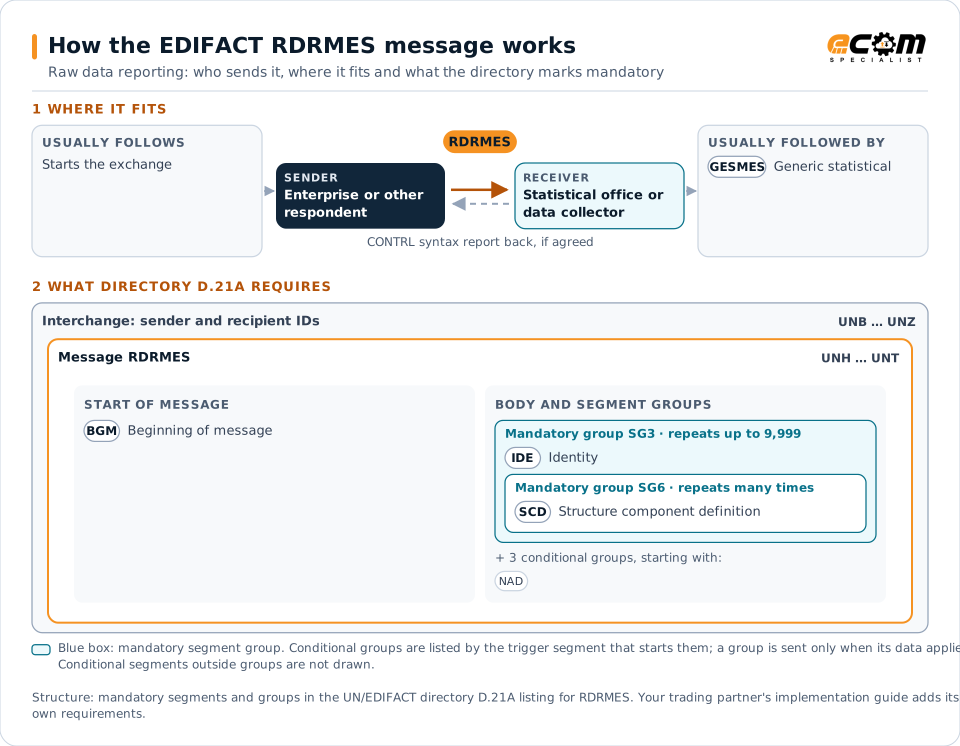
How to read this diagram: the top row shows who sends RDRMES, to whom, and which messages usually come before and after it. The lower part shows what the directory D.21A itself requires: the envelopes around RDRMES and the segments and segment groups it marks mandatory. Conditional groups are listed by their trigger segment rather than drawn in full. This is the directory's minimum, not a trading partner's requirement: a message implementation guide, such as an industry subset or a partner’s own guide, usually makes some conditional groups mandatory, restricts the codes and may use an older directory.
When it is used
- Answering recurring statistical surveys
- Reporting predefined data items to a collector
- Replacing paper or web survey forms
Where it fits in the message flow
Structure
Mandatory segments in RDRMES (directory D.21A)
In UN/EDIFACT directory D.21A, the RDRMES message has 25 segment positions arranged in 8 segment groups. These are the segments and segment groups marked mandatory at message level, in order; a mandatory group is shown with the segment that starts it. Segments inside conditional groups are needed only when the group is used. This is the directory’s requirement, not your trading partner’s: each partner’s message implementation guide names the directory it uses, often an older one such as D.96A or D.01B where the structure can differ, makes some conditional segments mandatory and restricts the codes.
- UNH
- BGM
- SG3 (IDE)
- UNT
Practical example
RDRMES in practice
A manufacturer must report monthly production volumes and turnover to the national statistics office. Its ERP extracts the figures and sends an RDRMES answering each survey question by its identifier. The statistics office validates the answers and includes them in the monthly industrial statistics.
Implementation
Implementation considerations for RDRMES
- Map survey question identifiers to internal data sources.
- Submit answers within the survey calendar for each period.
- Validate figures before submission to avoid follow-up queries.
- Check which electronic formats the collector currently accepts.
How ECOM helps
Automate RDRMES with ECOM
Industry
Manufacturing
Customer schedules, supplier connectivity and shipping integrated with the ERP for manufacturers.
Solution
Enterprise Integration
Any-to-any integration across partners, systems, protocols, security requirements, formats and ERPs, in batch or real time.
Solution
EDI Integration
Exchange X12 and EDIFACT documents with partners and integrate them directly with your ERP.
Compare X12 and EDIFACT, or see answers to general questions in the EDI FAQ.
Related messages
Related statistics and reporting messages
Need help with RDRMES?
ECOM maps, tests and monitors EDIFACT messages for your trading partners and integrates them with your ERP.