
EDIFACT message guide · Communications
PROSRV Product service
The UN/EDIFACT message repair and service centers use to report repairs and services performed to manufacturers, including warranty claims.
- Sent by
- Servicing or repair center
- Received by
- Manufacturer
- Standard
- UN/EDIFACT · Batch message
- X12 equivalent
- No direct equivalent
What is the EDIFACT PROSRV message?
PROSRV is the UN/EDIFACT product service message. The directory defines it as a message giving servicing and repair centers the means to report to manufacturers on repairs and other services carried out on products and appliances, with the details needed to claim reimbursement under warranty or contract.
The report identifies the product and its serial number, the fault, the work done, parts used and labor time. Manufacturers validate the claim against warranty terms and use the data to analyze product quality.
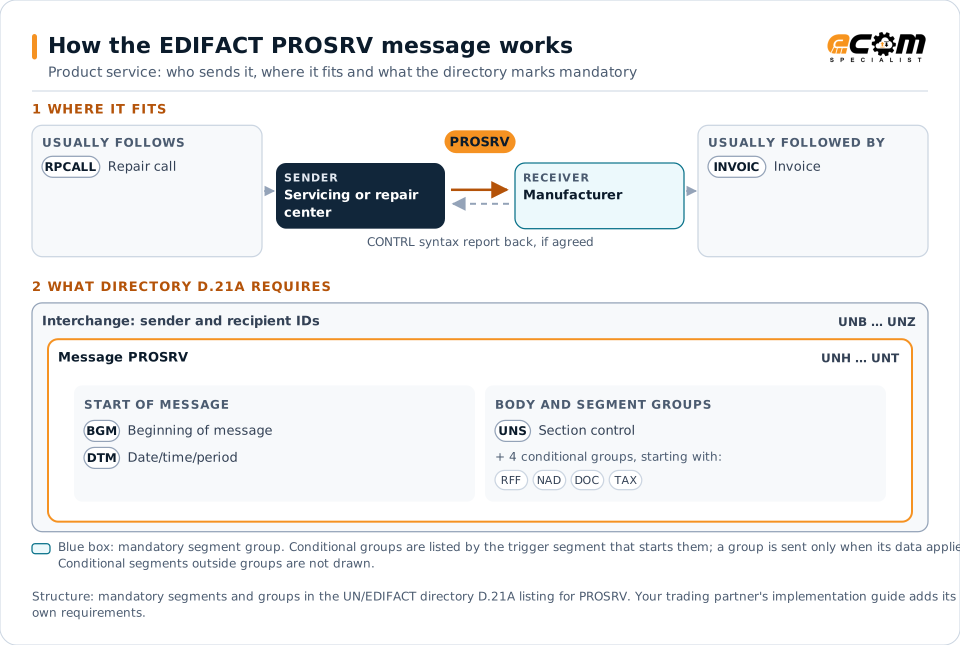
How to read this diagram: the top row shows who sends PROSRV, to whom, and which messages usually come before and after it. The lower part shows what the directory D.21A itself requires: the envelopes around PROSRV and the segments and segment groups it marks mandatory. Conditional groups are listed by their trigger segment rather than drawn in full. This is the directory's minimum, not a trading partner's requirement: a message implementation guide, such as an industry subset or a partner’s own guide, usually makes some conditional groups mandatory, restricts the codes and may use an older directory.
When it is used
- Claiming warranty repairs from a manufacturer
- Reporting service work under a service contract
- Providing fault data for quality analysis
Where it fits in the message flow
Structure
Mandatory segments in PROSRV (directory D.21A)
In UN/EDIFACT directory D.21A, the PROSRV message has 63 segment positions arranged in 19 segment groups. These are the segments and segment groups marked mandatory at message level, in order; a mandatory group is shown with the segment that starts it. Segments inside conditional groups are needed only when the group is used. This is the directory’s requirement, not your trading partner’s: each partner’s message implementation guide names the directory it uses, often an older one such as D.96A or D.01B where the structure can differ, makes some conditional segments mandatory and restricts the codes.
- UNH
- BGM
- DTM
- UNS
- UNT
Practical example
PROSRV in practice
An authorized service center repairs a washing machine still under warranty. It sends the manufacturer a PROSRV with the model and serial number, purchase date, the fault code, the parts replaced and the labor time. The manufacturer approves the claim, pays the service center and adds the fault to its quality statistics.
Implementation
Implementation considerations for PROSRV
- Use the manufacturer's fault, repair and part codes.
- Include serial numbers and purchase dates for warranty checks.
- Reference the repair call when the job came from the manufacturer.
- Track each warranty claim through to payment.
How ECOM helps
Automate PROSRV with ECOM
Industry
Manufacturing
Customer schedules, supplier connectivity and shipping integrated with the ERP for manufacturers.
Industry
Consumer Goods
Retail, distributor, marketplace and direct-channel integration for consumer brands.
Solution
B2B Integration
Connect every customer, supplier, carrier and bank across EDI, API, file and portal channels.
Compare X12 and EDIFACT, or see answers to general questions in the EDI FAQ.
Related messages
Related communications messages
Need help with PROSRV?
ECOM maps, tests and monitors EDIFACT messages for your trading partners and integrates them with your ERP.