
X12 transaction guide · Communications
EDI 996 File Transfer
The X12 document used to transmit file information in formats agreed between the sending and receiving parties.
- Sent by
- Any trading partner
- Received by
- Any trading partner
- Standard
- ANSI ASC X12
What is an EDI 996?
The EDI 996 File Transfer is the ANSI X12 transaction set used to transmit file information in formats agreed between the sending and receiving parties. It is not intended to replace or bypass existing X12 transaction sets for data they already accommodate.
The 996 lets partners carry data for which no transaction set exists, such as a proprietary file, inside the X12 envelope, so it travels over the same network and benefits from the same tracking and acknowledgments. Because the content is not standardized, both sides must agree its format separately.
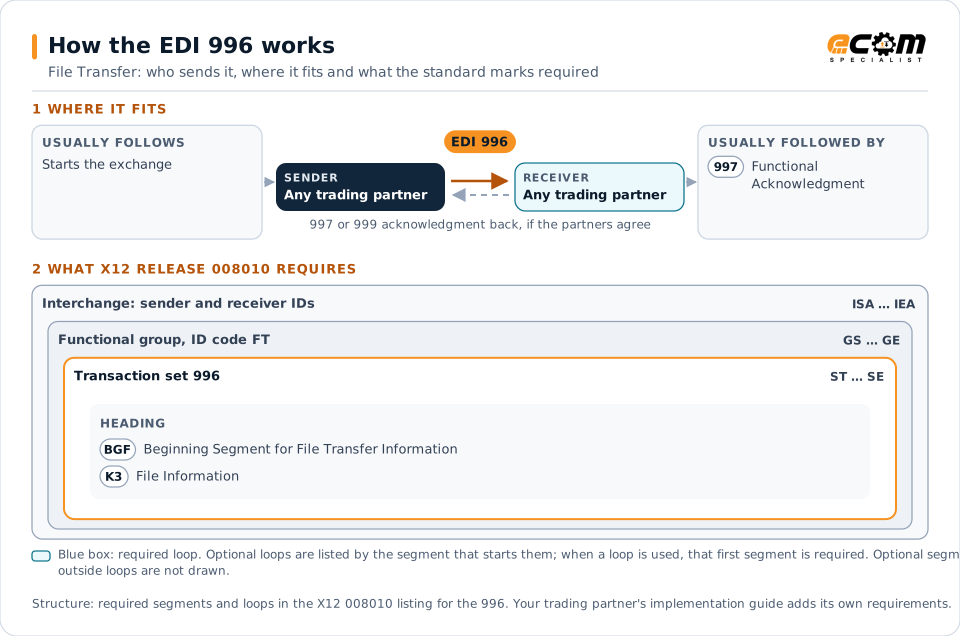
How to read this diagram: the top row shows who sends the 996, to whom, and which documents usually come before and after it. The lower part shows what X12 release 008010 itself requires: the envelopes around the 996 and the segments and loops the standard marks as required, area by area. Optional loops are listed by the segment that starts them rather than drawn in full. This is the standard's minimum, not a trading partner's requirement: each partner's implementation guide usually makes some optional loops mandatory, restricts the codes and may use a different release.
When it is used
- Sending proprietary files over an existing EDI connection
- Transferring data that no transaction set covers
- Keeping file exchanges within EDI tracking
Where it fits in the document flow
Structure
Mandatory segments in the 996 (X12 release 008010)
The segments X12 release 008010 marks as mandatory at their level, in order. Segments inside optional loops are needed only when the loop is used. This is the standard's requirement, not your trading partner's: each partner's implementation guide names the release it uses, adds the optional segments it requires and restricts the values. The requirement status comes from one published X12 reference listing and has not been checked against a second source.
- ST
- BGF
- K3
- SE
Practical example
The 996 in practice
A manufacturer and a supplier exchange engineering change data in a proprietary file format. To keep it on their EDI connection, the manufacturer wraps the file in a 996. The supplier's translator extracts the file and passes it to the engineering system, and returns a 997 confirming receipt.
Implementation
Implementation considerations for the 996
- Use a standard transaction set when one fits the data.
- Document the agreed file format separately.
- Check file size limits on the EDI network.
- Consider managed file transfer for large or binary files.
How ECOM helps
Automate the 996 with ECOM
Solution
Managed File Transfer
Design, migrate and operate secure, auditable file exchange across partners and systems.
Solution
EDI Integration
Exchange X12 and EDIFACT documents with partners and integrate them directly with your ERP.
Solution
B2B Integration
Connect every customer, supplier, carrier and bank across EDI, API, file and portal channels.
More general questions about EDI are answered in the EDI FAQ.
Related transactions
Related communications documents
Need help with the EDI 996?
ECOM maps, tests and monitors X12 documents for your trading partners and integrates them with your ERP.