
X12 transaction guide · Communications
EDI 102 Associated Data
The X12 document used to convey associated data, objects that do not use the usual transaction set structure, linked to other transactions.
- Sent by
- Any trading partner
- Received by
- Any trading partner
- Standard
- ANSI ASC X12
What is an EDI 102?
The EDI 102 Associated Data is the ANSI X12 transaction set that conveys associated data. Associated data is an object, a set of functionally related information that does not use the usual transaction set structure, such as a drawing, an image or a document. It may augment other business transactions, so references relating the object to the associated transaction must be provided.
The standard requires each object to carry an identification number that stays unique long enough to avoid confusion, and allows several references to link it with all related transaction sets. It is not media dependent and can be carried in any functional group.
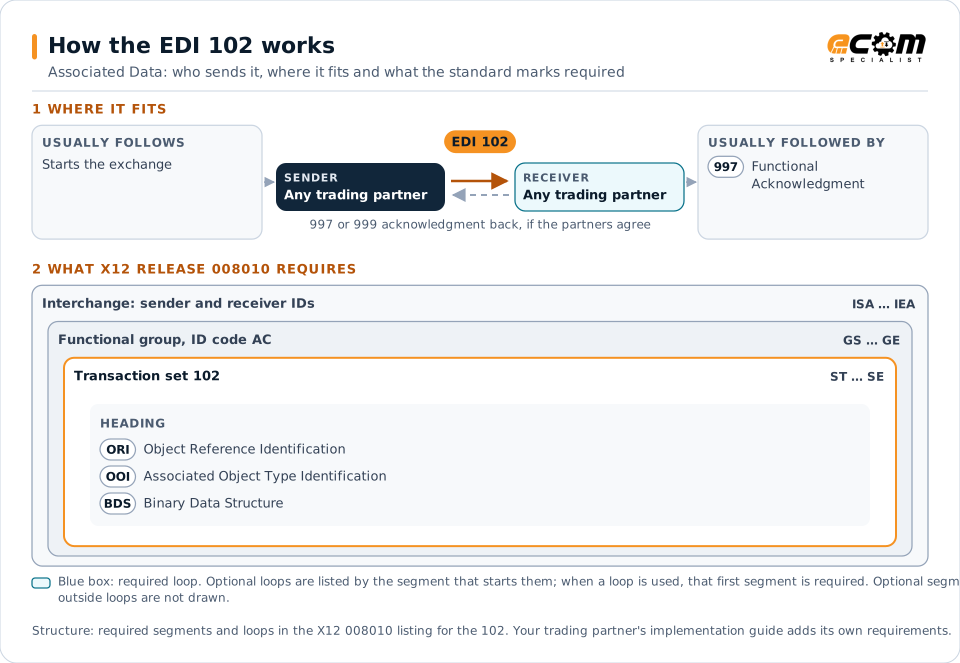
How to read this diagram: the top row shows who sends the 102, to whom, and which documents usually come before and after it. The lower part shows what X12 release 008010 itself requires: the envelopes around the 102 and the segments and loops the standard marks as required, area by area. Optional loops are listed by the segment that starts them rather than drawn in full. This is the standard's minimum, not a trading partner's requirement: each partner's implementation guide usually makes some optional loops mandatory, restricts the codes and may use a different release.
When it is used
- Sending drawings or images that support a transaction
- Attaching documents to orders or claims
- Linking non-EDI objects to EDI transactions
Where it fits in the document flow
Structure
Mandatory segments in the 102 (X12 release 008010)
The segments X12 release 008010 marks as mandatory at their level, in order. Segments inside optional loops are needed only when the loop is used. This is the standard's requirement, not your trading partner's: each partner's implementation guide names the release it uses, adds the optional segments it requires and restricts the values. The requirement status comes from one published X12 reference listing and has not been checked against a second source.
- ST
- ORI
- OOI
- BDS
- SE
Practical example
The 102 in practice
A manufacturer sends a supplier an order for a custom part and needs to provide the drawing. It sends the drawing as a 102 with an object identifier and a reference to the purchase order. The supplier's system stores the drawing and links it to the order for its engineers.
Implementation
Implementation considerations for the 102
- Assign object identifiers that stay unique over time.
- Reference every related transaction set.
- Check file size limits on the EDI network.
- Consider secure file transfer for very large objects.
How ECOM helps
Automate the 102 with ECOM
Solution
Managed File Transfer
Design, migrate and operate secure, auditable file exchange across partners and systems.
Solution
EDI Integration
Exchange X12 and EDIFACT documents with partners and integrate them directly with your ERP.
Solution
B2B Integration
Connect every customer, supplier, carrier and bank across EDI, API, file and portal channels.
More general questions about EDI are answered in the EDI FAQ.
Related transactions
Related communications documents
Need help with the EDI 102?
ECOM maps, tests and monitors X12 documents for your trading partners and integrates them with your ERP.