
X12 transaction guide · Finance
EDI 859 Freight Invoice
The X12 document a carrier uses to invoice charges, allowances and details for transportation services it performed.
- Sent by
- Carrier
- Received by
- Shipper, payer or government payment office
- Standard
- ANSI ASC X12
What is an EDI 859?
The EDI 859 Freight Invoice is the ANSI X12 transaction set a carrier uses to invoice charges, allowances and details for transportation services. It can also exchange invoices for services provided under government transportation rules, and is used by US civilian agencies, the Department of Defense and their carriers for freight, household goods and passenger movements.
Commercial motor carriers usually bill with the 210, and rail and ocean carriers have their own invoices (410, 310). The 859 is a general freight invoice used where the partner's implementation calls for it, often paired with the 858 shipment information it bills.
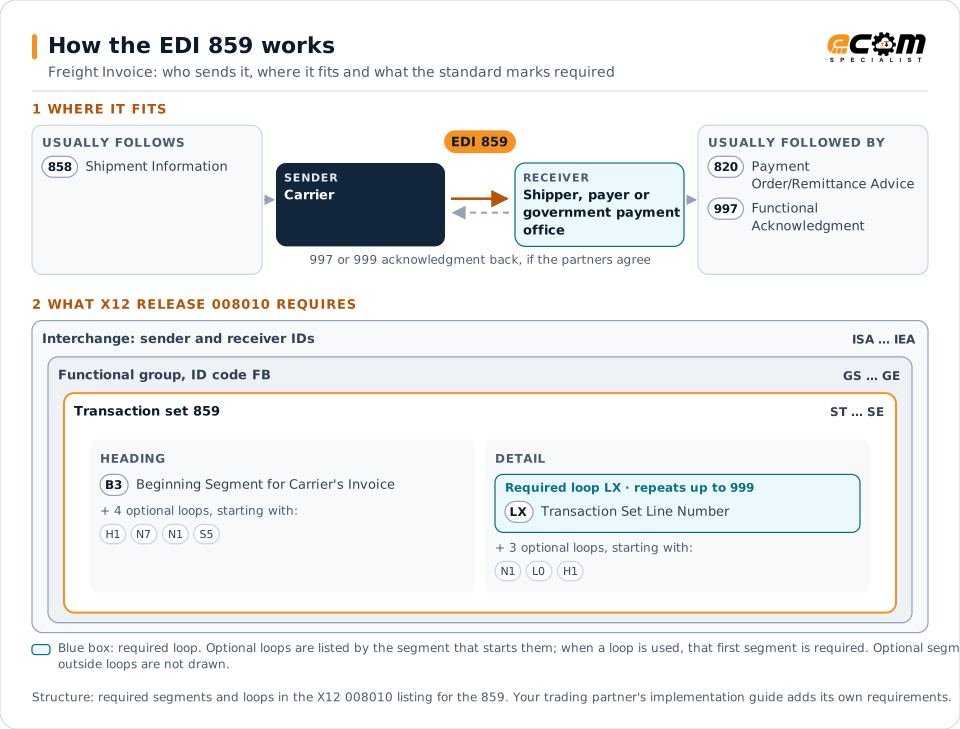
How to read this diagram: the top row shows who sends the 859, to whom, and which documents usually come before and after it. The lower part shows what X12 release 008010 itself requires: the envelopes around the 859 and the segments and loops the standard marks as required, area by area. Optional loops are listed by the segment that starts them rather than drawn in full. This is the standard's minimum, not a trading partner's requirement: each partner's implementation guide usually makes some optional loops mandatory, restricts the codes and may use a different release.
When it is used
- Billing a government agency for a shipment
- Invoicing transportation services where the 859 is specified
- Rebilling corrected freight charges
Where it fits in the document flow
Structure
Mandatory segments in the 859 (X12 release 008010)
The segments X12 release 008010 marks as mandatory at their level, in order. Segments inside optional loops are needed only when the loop is used. This is the standard's requirement, not your trading partner's: each partner's implementation guide names the release it uses, adds the optional segments it requires and restricts the values. The requirement status comes from one published X12 reference listing and has not been checked against a second source.
- ST
- B3
- H1
- N7
- N1
- S5
- LX
- L0
- SE
Practical example
The 859 in practice
After delivering a government shipment, a carrier sends the payment office an 859 referencing the bill of lading from the 858, with the linehaul charge, fuel surcharge and accessorial charges. The payment office audits the invoice against the shipment data and the carrier's rates, and schedules payment.
Implementation
Implementation considerations for the 859
- Reference the bill of lading or shipment identifier exactly as issued.
- Itemize accessorial charges with the codes the payer accepts.
- Know which freight invoice (210, 410, 310 or 859) each customer expects.
- Track audit adjustments so that short payments can be reconciled.
How ECOM helps
Automate the 859 with ECOM
Industry
Trucking and Transportation
Load tenders, responses, status and freight invoices for carriers, brokers and shippers, integrated with the TMS.
Solution
Financial Document Automation
Automate invoices, remittances, payment files and bank statements from capture to posting.
Solution
Logistics Automation
Automate tenders, status updates, freight invoices and warehouse orders with logistics partners.
More general questions about EDI are answered in the EDI FAQ.
Related transactions
Related finance documents
- 820Payment Order/Remittance Advice
- 110Air Freight Details and Invoice
- 223Consolidators Freight Bill and Invoice
- 224Motor Carrier Summary Freight Bill Manifest
- 412Trailer or Container Repair Billing
- 414Rail Carhire Settlements
- 424Rail Carrier Services Settlement
- 810Invoice
- 880Grocery Products Invoice
- 811Consolidated Service Invoice/Statement
Need help with the EDI 859?
ECOM maps, tests and monitors X12 documents for your trading partners and integrates them with your ERP.