
X12 transaction guide · Government and regulatory
EDI 567 Contract Completion Status
The X12 document used to report the administrative closure status of completed contracts.
- Sent by
- Contract administration office
- Received by
- Contracting, payment or finance offices
- Standard
- ANSI ASC X12
What is an EDI 567?
The EDI 567 Contract Completion Status is the ANSI X12 transaction set used to report administrative closure status on completed contracts. The originator can use it to close contract files, indicate why contracts remain open, and report closeout progress.
After delivery, a contract must be closed administratively: final payments made, excess funds released and records archived. Reporting closure status electronically helps agencies track backlogs of contracts awaiting closeout and release unused funds. Reasons for open status are coded. Backlogs can then be managed.
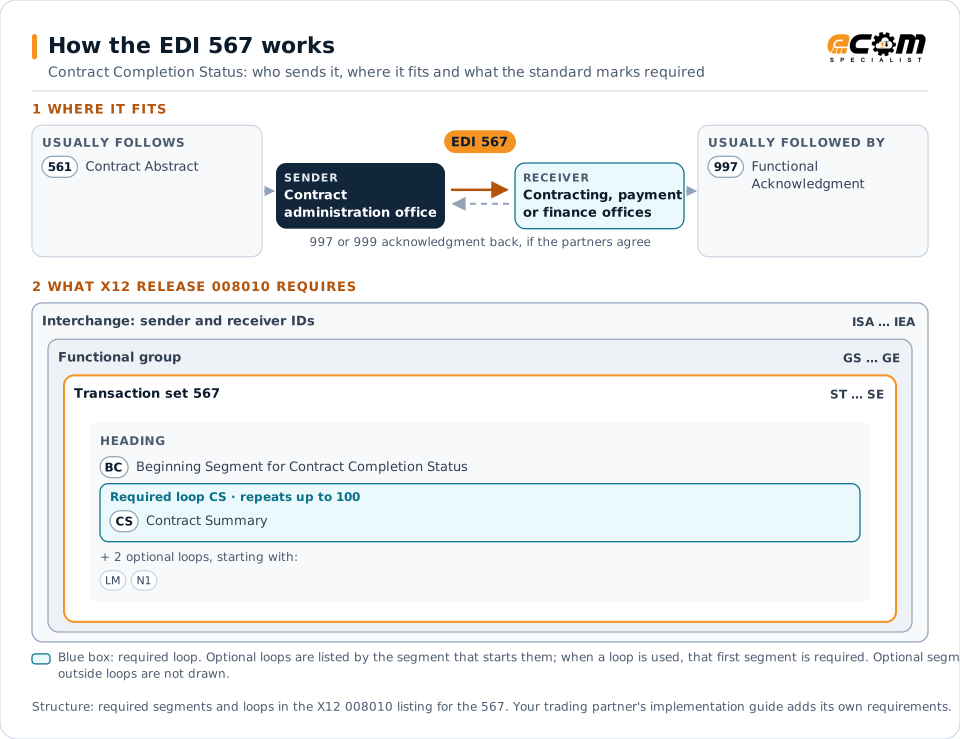
How to read this diagram: the top row shows who sends the 567, to whom, and which documents usually come before and after it. The lower part shows what X12 release 008010 itself requires: the envelopes around the 567 and the segments and loops the standard marks as required, area by area. Optional loops are listed by the segment that starts them rather than drawn in full. This is the standard's minimum, not a trading partner's requirement: each partner's implementation guide usually makes some optional loops mandatory, restricts the codes and may use a different release.
When it is used
- Reporting that a contract is closed
- Reporting reasons a contract remains open
- Tracking closeout progress
Where it fits in the document flow
Structure
Mandatory segments in the 567 (X12 release 008010)
The segments X12 release 008010 marks as mandatory at their level, in order. Segments inside optional loops are needed only when the loop is used. This is the standard's requirement, not your trading partner's: each partner's implementation guide names the release it uses, adds the optional segments it requires and restricts the values. The requirement status comes from one published X12 reference listing and has not been checked against a second source.
- ST
- BC
- CS
- LM
- LQ
- N1
- SE
Practical example
The 567 in practice
A contract administration office completes the final audit and payment on a contract. It sends the contracting and finance offices a 567 reporting the contract as closed and the remaining funds available for deobligation. The finance office releases the funds.
Implementation
Implementation considerations for the 567
- Report reasons for contracts that cannot be closed.
- Coordinate final payments before closure.
- Release unused contract funds promptly after closure.
- Follow the agency's closeout procedures.
How ECOM helps
Automate the 567 with ECOM
Solution
Procure-to-Pay Automation
Automate purchasing, receiving and supplier invoicing across EDI, portals and documents.
Solution
Financial Document Automation
Automate invoices, remittances, payment files and bank statements from capture to posting.
Solution
EDI Integration
Exchange X12 and EDIFACT documents with partners and integrate them directly with your ERP.
More general questions about EDI are answered in the EDI FAQ.
Related transactions
Related government and regulatory documents
Need help with the EDI 567?
ECOM maps, tests and monitors X12 documents for your trading partners and integrates them with your ERP.