
The short answer
AS2 and SFTP both move files securely. AS2 sends messages over HTTP or HTTPS with message-level encryption, digital signatures and signed delivery receipts (MDNs), which makes it popular for EDI with retailers. SFTP transfers files over an encrypted SSH connection and is simpler to set up but does not provide signed proof of delivery on its own.
AS2 vs SFTP
| Criteria | AS2 | SFTP |
|---|---|---|
| Transport | HTTP or HTTPS with S/MIME message security | SSH File Transfer Protocol |
| Delivery proof | Signed message disposition notifications (MDNs) | None built in; relies on logs or follow-up files |
| Authentication | X.509 certificates for signing and encryption | SSH keys and/or passwords |
| Connection model | Push: each side sends to the other's endpoint | Client connects to a server to upload or download |
| Common use | Retail and supply chain EDI | Bank files, bulk data and many B2B exchanges |
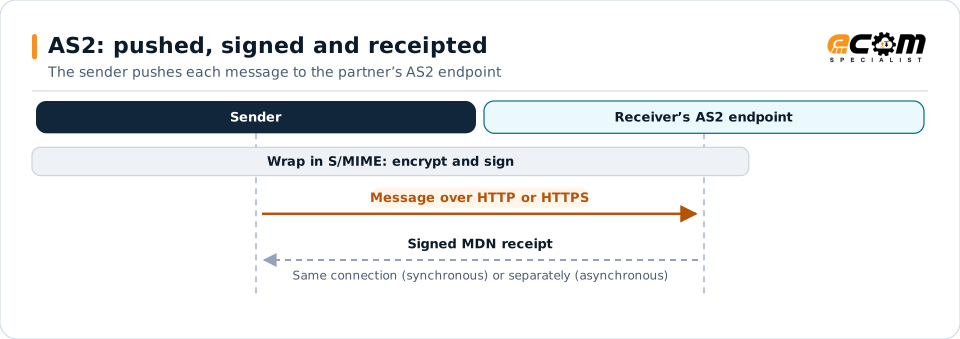
The signed MDN is proof that the message arrived intact, which is why AS2 is common in retail EDI.
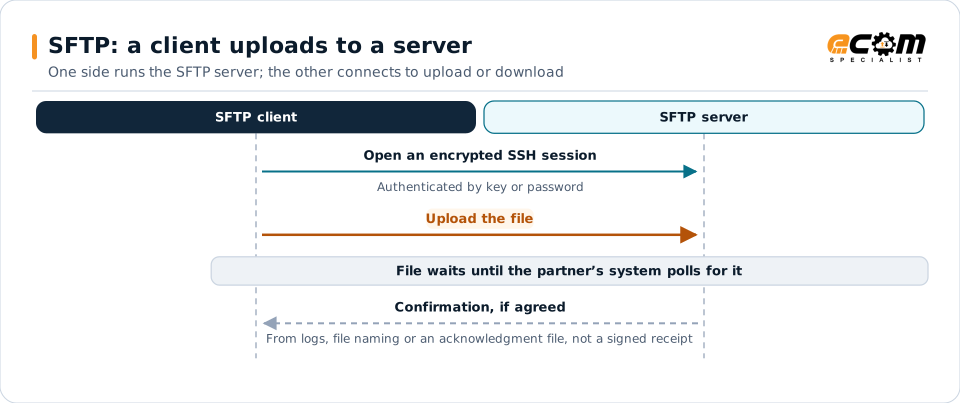
SFTP is simpler to set up and good for large files and scheduled batches, but on its own it gives no signed proof of delivery, and polling schedules affect timing.
Both secure, built differently
AS2 and SFTP are the two most common ways to send business files directly between companies. Each encrypts data in transit, but they were designed for different purposes.
AS2
AS2 (Applicability Statement 2) wraps each message in S/MIME security and sends it over HTTP or HTTPS to the partner’s AS2 endpoint. The message is encrypted so only the receiver can read it and signed so the receiver knows who sent it and that it was not altered. The receiver returns a signed MDN, a receipt proving the message arrived intact.
Strengths: proof of delivery and non-repudiation through signed receipts, near-real-time push delivery, wide adoption in retail EDI. Receipts can be returned on the same connection (synchronous) or separately (asynchronous), which partners specify during setup.
Effort: each partner connection needs AS2 identifiers, URLs and certificates, and certificates must be renewed and exchanged before they expire.
SFTP
SFTP transfers files over an encrypted SSH session. One side runs an SFTP server; the other connects as a client to upload or download files, authenticated by keys or passwords.
Strengths: simple, widely supported, good for large files and scheduled batches, common with banks and data providers.
Effort: lower setup effort, but delivery confirmation must come from server logs, file naming conventions or acknowledgment files, and polling schedules affect timing.
Choosing between them
- Use AS2 when partners require it or when signed proof of delivery matters, which is typical in retail and supply chain EDI.
- Use SFTP for bank files, bulk data, partners that prefer it, or internal transfers.
- Avoid plain FTP for business data.
Managed file transfer platforms support both, monitor every transfer and track certificate and key expiry, so you can use the right protocol per partner without separate tools.