
EDIFACT message guide · Planning and inventory
SLSRPT Sales data report
The UN/EDIFACT message used to report product sales activity, such as quantities, prices and locations, for analysis and replenishment.
- Sent by
- Retailer or distributor
- Received by
- Supplier or manufacturer
- Standard
- UN/EDIFACT · Batch message
- X12 equivalent
- 852 Product Activity Data
What is the EDIFACT SLSRPT message?
SLSRPT is the UN/EDIFACT sales data report message. The directory describes it as a message conveying product activity related to the sale of products or services: the activity location, date, time or period, quantities, prices, monetary amounts, market sector and parties. The recipient uses it for statistical and quantitative analysis supporting production, planning, marketing and replenishment.
Retailers send sales reports to suppliers that manage their own replenishment or that need sell-through data to plan production and promotions. Reports are usually weekly or daily, by item and store.
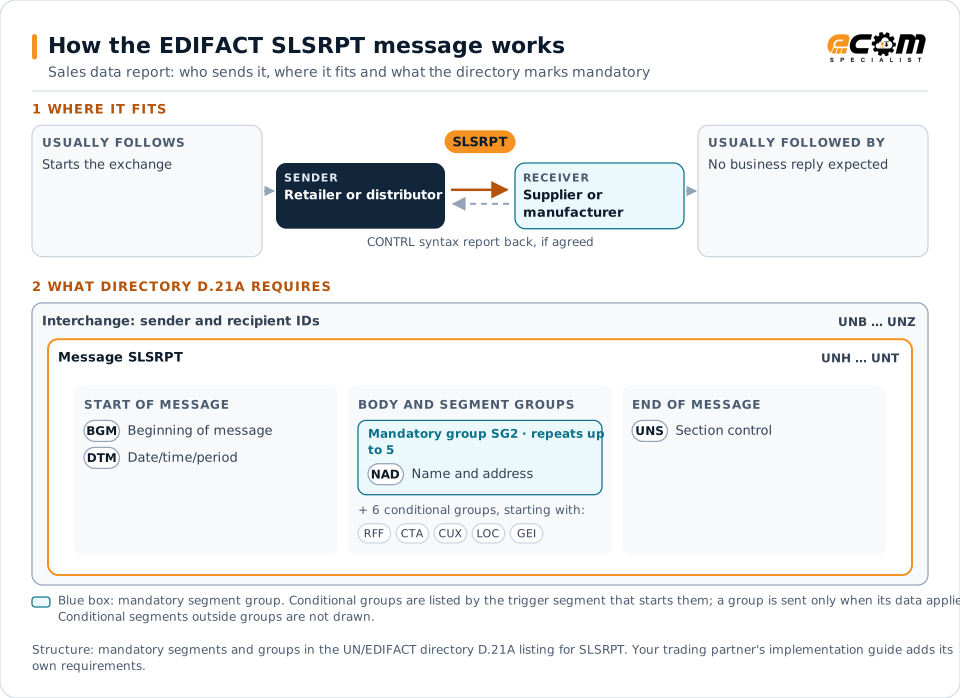
How to read this diagram: the top row shows who sends SLSRPT, to whom, and which messages usually come before and after it. The lower part shows what the directory D.21A itself requires: the envelopes around SLSRPT and the segments and segment groups it marks mandatory. Conditional groups are listed by their trigger segment rather than drawn in full. This is the directory's minimum, not a trading partner's requirement: a message implementation guide, such as an industry subset or a partner’s own guide, usually makes some conditional groups mandatory, restricts the codes and may use an older directory.
When it is used
- Sharing store-level sales with suppliers
- Supporting vendor-managed replenishment
- Measuring promotion performance
Where it fits in the message flow
No other message routinely comes directly before or after SLSRPT; it is exchanged when the business event occurs. If the partners agree, the receiver confirms each interchange with a CONTRL syntax and service report.
Structure
Mandatory segments in SLSRPT (directory D.21A)
In UN/EDIFACT directory D.21A, the SLSRPT message has 57 segment positions arranged in 14 segment groups. These are the segments and segment groups marked mandatory at message level, in order; a mandatory group is shown with the segment that starts it. Segments inside conditional groups are needed only when the group is used. This is the directory’s requirement, not your trading partner’s: each partner’s message implementation guide names the directory it uses, often an older one such as D.96A or D.01B where the structure can differ, makes some conditional segments mandatory and restricts the codes.
- UNH
- BGM
- DTM
- SG2 (NAD)
- UNS
- UNT
Practical example
SLSRPT in practice
A home and garden retailer sends its key suppliers a SLSRPT each Monday with the previous week's sales by item and store, including units, sales value and returns. A garden tools supplier uses the data to spot slow sellers, adjust its production plan and propose reorders before stores run out.
Implementation
Implementation considerations for SLSRPT
- Agree the reporting period, locations and level of detail.
- Separate sales from returns and promotions where the partner needs it.
- Combine sales with inventory reports for replenishment decisions.
- Respect any confidentiality limits on sharing the data.
How ECOM helps
Automate SLSRPT with ECOM
Industry
Retail
Retail and eCommerce EDI for suppliers and retailers, from purchase order to payment, with compliance built in.
Industry
Consumer Goods
Retail, distributor, marketplace and direct-channel integration for consumer brands.
Solution
Supply Chain Visibility
Track orders, shipments and invoices across partners and catch exceptions early.
Compare X12 and EDIFACT, or see answers to general questions in the EDI FAQ.
Related messages
Related planning and inventory messages
Need help with SLSRPT?
ECOM maps, tests and monitors EDIFACT messages for your trading partners and integrates them with your ERP.