
EDIFACT message guide · Insurance
ICSOLI Insurance claim solicitor's instruction
The UN/EDIFACT message insurers and their solicitors use to exchange claim details and instructions during claim dispute resolution.
- Sent by
- Insurer or solicitor
- Received by
- Solicitor or insurer
- Standard
- UN/EDIFACT · Batch message
- X12 equivalent
- No direct equivalent
What is the EDIFACT ICSOLI message?
ICSOLI is the UN/EDIFACT insurance claim solicitor's instruction. The directory defines it as a message exchanged between insurers and solicitors acting for the insurer during claim dispute resolution. It lets the insurer provide claim details and instructions, and lets the solicitor report back.
When a claim is disputed or litigated, the insurer appoints a solicitor and must share the claim file and its instructions, then follow progress and costs. Structured messages make that exchange traceable for both parties. It covers costs as well.
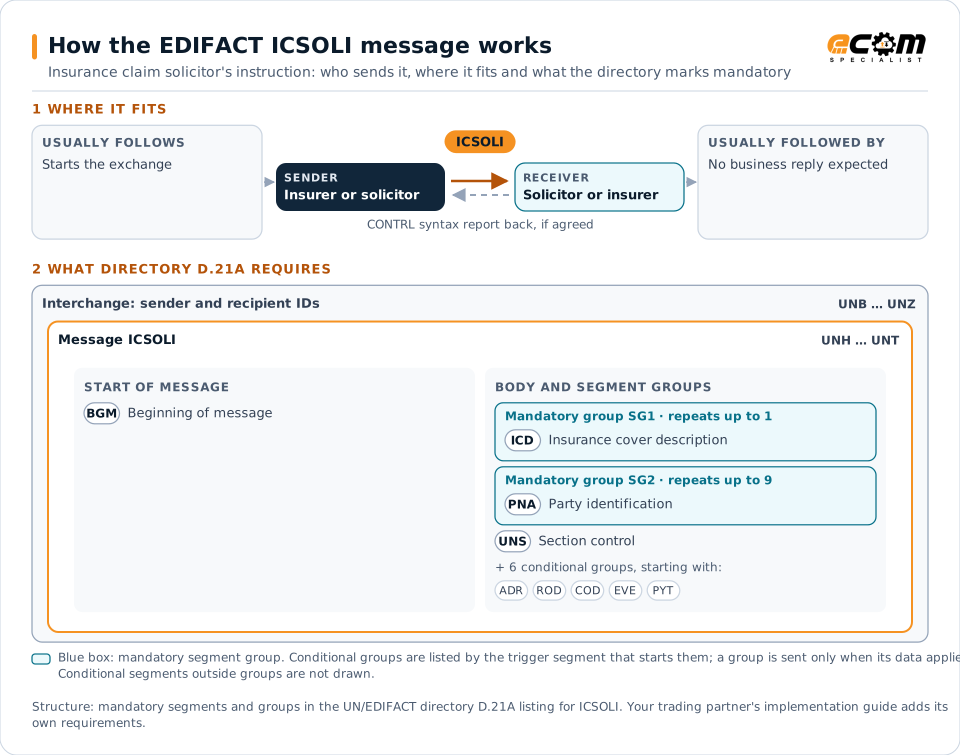
How to read this diagram: the top row shows who sends ICSOLI, to whom, and which messages usually come before and after it. The lower part shows what the directory D.21A itself requires: the envelopes around ICSOLI and the segments and segment groups it marks mandatory. Conditional groups are listed by their trigger segment rather than drawn in full. This is the directory's minimum, not a trading partner's requirement: a message implementation guide, such as an industry subset or a partner’s own guide, usually makes some conditional groups mandatory, restricts the codes and may use an older directory.
When it is used
- Instructing a solicitor on a disputed claim
- Receiving progress reports from solicitors
- Exchanging cost and settlement information
Where it fits in the message flow
No other message routinely comes directly before or after ICSOLI; it is exchanged when the business event occurs. If the partners agree, the receiver confirms each interchange with a CONTRL syntax and service report.
Structure
Mandatory segments in ICSOLI (directory D.21A)
In UN/EDIFACT directory D.21A, the ICSOLI message has 64 segment positions arranged in 10 segment groups. These are the segments and segment groups marked mandatory at message level, in order; a mandatory group is shown with the segment that starts it. Segments inside conditional groups are needed only when the group is used. This is the directory’s requirement, not your trading partner’s: each partner’s message implementation guide names the directory it uses, often an older one such as D.96A or D.01B where the structure can differ, makes some conditional segments mandatory and restricts the codes.
- UNH
- BGM
- SG1 (ICD)
- SG2 (PNA)
- UNS
- UNT
Practical example
ICSOLI in practice
A motor insurer contests a personal injury claim. It sends its panel solicitor an ICSOLI with the claim details, the policy, the accident circumstances and instructions to negotiate a settlement within a reserve. The solicitor reports progress and the final settlement through the same message.
Implementation
Implementation considerations for ICSOLI
- Protect confidential and personal data in claim files.
- Reference the claim consistently across insurer and solicitor systems.
- Track legal costs against agreed budgets.
- Record instructions and responses for audit.
How ECOM helps
Automate ICSOLI with ECOM
Industry
Financial Services
Secure file transfer and B2B integration for banks and financial institutions.
Solution
B2B Integration
Connect every customer, supplier, carrier and bank across EDI, API, file and portal channels.
Solution
EDI Integration
Exchange X12 and EDIFACT documents with partners and integrate them directly with your ERP.
Compare X12 and EDIFACT, or see answers to general questions in the EDI FAQ.
Related messages
Related insurance messages
- ICASRPInsurance claim assessment and reporting
- IFTICLCargo insurance claims
- INSPREInsurance premium
- IPPOADInsurance policy administration
- IPPOMOMotor insurance policy
- PRPAIDInsurance premium payment
- ISENDSIntermediary system enablement or disablement
- LREACTLife reinsurance activity
- LRECLMLife reinsurance claims
- REBORDReinsurance bordereau
- RECALCReinsurance calculation
- RECLAMReinsurance claims
Need help with ICSOLI?
ECOM maps, tests and monitors EDIFACT messages for your trading partners and integrates them with your ERP.