
EDIFACT message guide · Finance
COLREQ Request for a documentary collection
The UN/EDIFACT message a principal sends its remitting bank to initiate a documentary collection, or to report a direct collection.
- Sent by
- Principal (usually the exporter)
- Received by
- Remitting bank
- Standard
- UN/EDIFACT · Batch message
- X12 equivalent
- No direct equivalent
What is the EDIFACT COLREQ message?
COLREQ is the UN/EDIFACT request for a documentary collection. The directory defines it as a message sent by the principal to the remitting bank, requesting it to initiate a documentary collection order, or informing it that the principal has initiated a direct documentary collection.
In a documentary collection, the exporter's bank sends shipping documents to the importer's bank, which releases them against payment or acceptance of a draft. It is simpler and cheaper than a letter of credit but gives the exporter less security. The request states the documents, the amount and the release conditions.
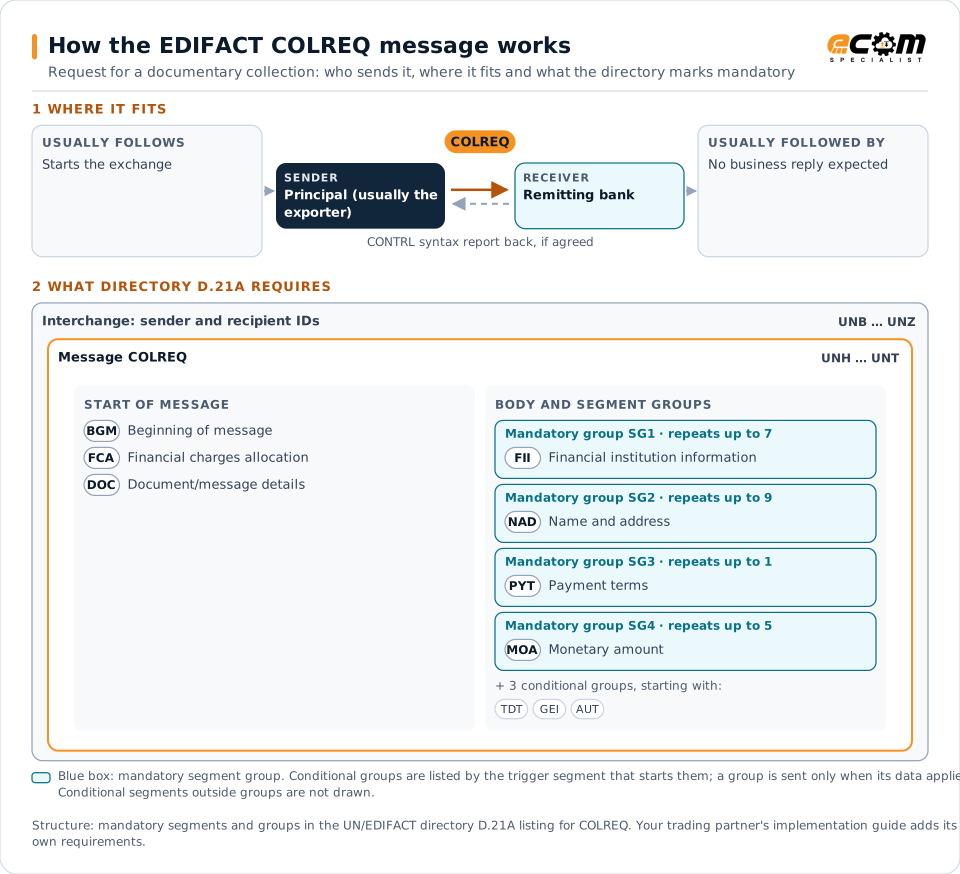
How to read this diagram: the top row shows who sends COLREQ, to whom, and which messages usually come before and after it. The lower part shows what the directory D.21A itself requires: the envelopes around COLREQ and the segments and segment groups it marks mandatory. Conditional groups are listed by their trigger segment rather than drawn in full. This is the directory's minimum, not a trading partner's requirement: a message implementation guide, such as an industry subset or a partner’s own guide, usually makes some conditional groups mandatory, restricts the codes and may use an older directory.
When it is used
- Collecting payment against shipping documents
- Releasing documents against acceptance of a draft
- Notifying the bank of a direct collection
Where it fits in the message flow
No other message routinely comes directly before or after COLREQ; it is exchanged when the business event occurs. If the partners agree, the receiver confirms each interchange with a CONTRL syntax and service report.
Structure
Mandatory segments in COLREQ (directory D.21A)
In UN/EDIFACT directory D.21A, the COLREQ message has 32 segment positions arranged in 7 segment groups. These are the segments and segment groups marked mandatory at message level, in order; a mandatory group is shown with the segment that starts it. Segments inside conditional groups are needed only when the group is used. This is the directory’s requirement, not your trading partner’s: each partner’s message implementation guide names the directory it uses, often an older one such as D.96A or D.01B where the structure can differ, makes some conditional segments mandatory and restricts the codes.
- UNH
- BGM
- FCA
- DOC
- SG1 (FII)
- SG2 (NAD)
- SG3 (PYT)
- SG4 (MOA)
- UNT
Practical example
COLREQ in practice
A furniture exporter ships to a long-standing customer abroad on documents-against-payment terms. After shipment, its system sends its bank a COLREQ with the importer's bank, the amount, the documents enclosed and the instruction to release them only against payment. The bank forwards the documents and credits the exporter once the importer pays.
Implementation
Implementation considerations for COLREQ
- State the release conditions clearly, against payment or against acceptance.
- List every document being sent with the collection.
- Follow the applicable ICC rules for collections.
- Track collections until payment or acceptance is reported.
How ECOM helps
Automate COLREQ with ECOM
Industry
Financial Services
Secure file transfer and B2B integration for banks and financial institutions.
Solution
Financial Document Automation
Automate invoices, remittances, payment files and bank statements from capture to posting.
Industry
Trucking and Transportation
Load tenders, responses, status and freight invoices for carriers, brokers and shippers, integrated with the TMS.
Compare X12 and EDIFACT, or see answers to general questions in the EDI FAQ.
Related messages
Related finance messages
- DOCAMRRequest for an amendment of a documentary credit
- DOCAPPDocumentary credit application
- DOCINFDocumentary credit issuance information
- DOCADVDocumentary credit advice
- DOCAMAAdvice of an amendment of a documentary credit
- DOCAMIDocumentary credit amendment information
- DOCAREResponse to an amendment of a documentary credit
- AUTHORAuthorization
- BALANCBalance
- BANSTABanking status
- BUSCRDBusiness credit report
- CHACCOChart of accounts
Need help with COLREQ?
ECOM maps, tests and monitors EDIFACT messages for your trading partners and integrates them with your ERP.