
X12 transaction guide · Master data
EDI 838 Trading Partner Profile
The X12 document used to request, change, verify or transmit business profile information to or from a trading partner.
- Sent by
- Trading partner (often a supplier or vendor)
- Received by
- Trading partner (often a buyer or government agency)
- Standard
- ANSI ASC X12
What is an EDI 838?
The EDI 838 Trading Partner Profile is the ANSI X12 transaction set used to request, change, verify or transmit business profile information to or from a trading partner. The receiver uses the information to process the sender's business transactions.
Profile data includes company identification, addresses, contacts, bank details and EDI capabilities. Government vendor registration programs used the 838 to collect supplier profiles, and companies can use it to keep partner master data current without forms. Profiles can also describe a partner's EDI capabilities, such as the transaction sets and versions it supports.
How to read this diagram: the top row shows who sends the 838, to whom, and which documents usually come before and after it. The lower part shows what X12 release 008010 itself requires: the envelopes around the 838 and the segments and loops the standard marks as required, area by area. Optional loops are listed by the segment that starts them rather than drawn in full. This is the standard's minimum, not a trading partner's requirement: each partner's implementation guide usually makes some optional loops mandatory, restricts the codes and may use a different release.
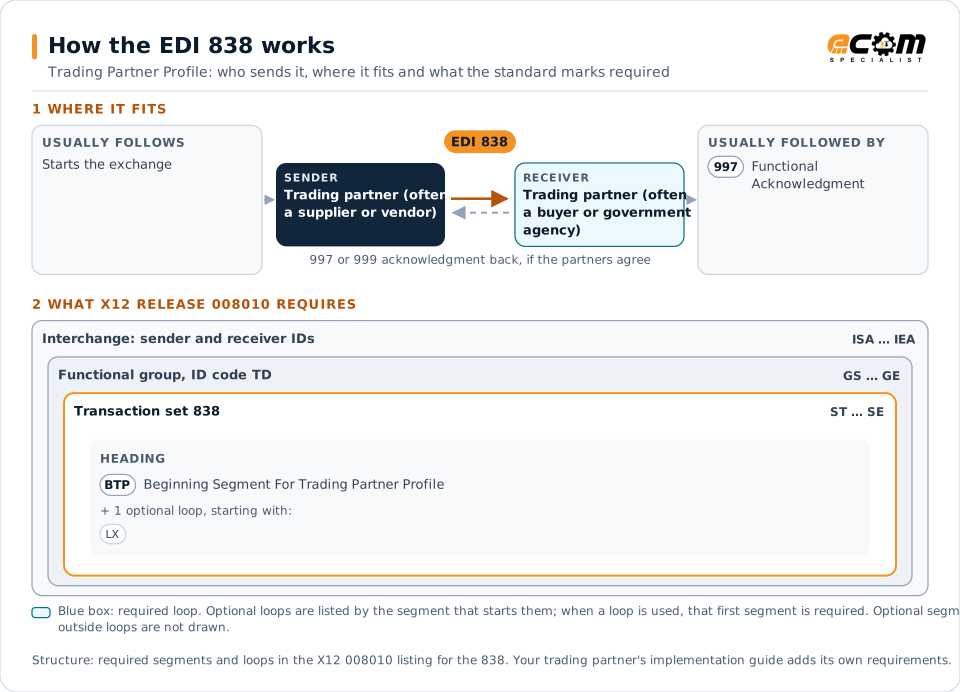
When it is used
- Registering as a vendor with a buyer
- Updating company profile or bank details
- Verifying profile data held by a partner
Where it fits in the document flow
Structure
Mandatory segments in the 838 (X12 release 008010)
The segments X12 release 008010 marks as mandatory at their level, in order. Segments inside optional loops are needed only when the loop is used. This is the standard's requirement, not your trading partner's: each partner's implementation guide names the release it uses, adds the optional segments it requires and restricts the values. The requirement status comes from one published X12 reference listing and has not been checked against a second source.
- ST
- BTP
- LX
- N1
- LCD
- TPD
- TUD
- SPR
- PAM
- TXN
- LM
- LQ
- ENE
- SE
Practical example
The 838 in practice
A supplier changes its remittance address and bank account. It sends its main customer an 838 updating its profile with the new details and effective date. The customer verifies the change through a callback, updates its vendor master and pays future invoices to the new account.
Implementation
Implementation considerations for the 838
- Verify bank detail changes through a separate channel to prevent fraud.
- Keep identifiers consistent with orders and invoices.
- Send profile changes with their effective dates.
- Decide which party owns each item of profile data.
How ECOM helps
Automate the 838 with ECOM
Solution
Trading Partner Onboarding
EDI certification and automation onboarding for customers, suppliers and carriers, by whichever method each partner can support.
Solution
B2B Integration
Connect every customer, supplier, carrier and bank across EDI, API, file and portal channels.
Solution
Procure-to-Pay Automation
Automate purchasing, receiving and supplier invoicing across EDI, portals and documents.
More general questions about EDI are answered in the EDI FAQ.
Need help with the EDI 838?
ECOM maps, tests and monitors X12 documents for your trading partners and integrates them with your ERP.