
X12 transaction guide · Catalogs and pricing
EDI 503 Pricing History
The bi-directional X12 document used by a buyer or vendor to request, or respond with, pricing history for an item.
- Sent by
- Purchasing party or vendor
- Received by
- Vendor or purchasing party
- Standard
- ANSI ASC X12
What is an EDI 503?
The EDI 503 Pricing History is the bi-directional ANSI X12 transaction set a purchasing party or vendor can use to request pricing history information for an item, and to respond to such a request.
Buyers use pricing history to judge whether a new price is reasonable, for example by comparing it with past purchases of the same item at similar quantities. It is particularly relevant in government procurement, where price reasonableness must be documented. It supports price negotiations as well.
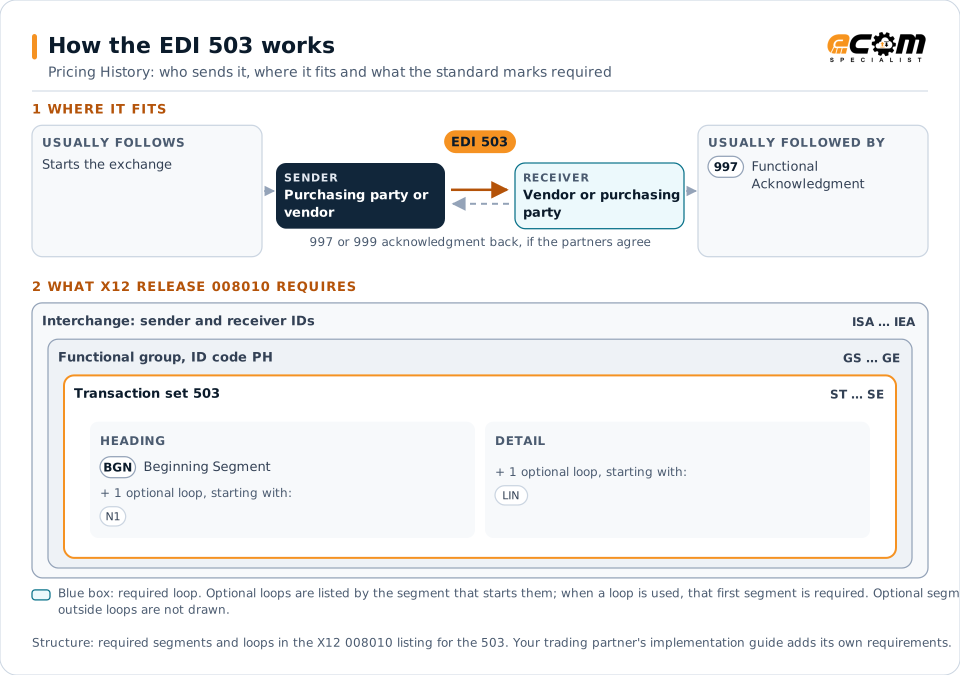
How to read this diagram: the top row shows who sends the 503, to whom, and which documents usually come before and after it. The lower part shows what X12 release 008010 itself requires: the envelopes around the 503 and the segments and loops the standard marks as required, area by area. Optional loops are listed by the segment that starts them rather than drawn in full. This is the standard's minimum, not a trading partner's requirement: each partner's implementation guide usually makes some optional loops mandatory, restricts the codes and may use a different release.
When it is used
- Requesting past prices for an item
- Supporting price reasonableness analysis
- Responding to pricing history requests
Where it fits in the document flow
Structure
Mandatory segments in the 503 (X12 release 008010)
The segments X12 release 008010 marks as mandatory at their level, in order. Segments inside optional loops are needed only when the loop is used. This is the standard's requirement, not your trading partner's: each partner's implementation guide names the release it uses, adds the optional segments it requires and restricts the values. The requirement status comes from one published X12 reference listing and has not been checked against a second source.
- ST
- BGN
- N1
- LIN
- LM
- LQ
- QTY
- SE
Practical example
The 503 in practice
A buyer receives a quote for a spare part that seems high. It sends a 503 requesting pricing history for the part. The response lists past purchases with dates, quantities and unit prices, and the buyer uses them to negotiate the new price.
Implementation
Implementation considerations for the 503
- Compare prices at similar quantities and terms.
- Identify items consistently over the whole history.
- Include dates so price trends can be analyzed.
- Protect commercially sensitive price data.
How ECOM helps
Automate the 503 with ECOM
Solution
Procure-to-Pay Automation
Automate purchasing, receiving and supplier invoicing across EDI, portals and documents.
Industry
Industrial Manufacturing
Distributor, OEM customer and supplier integration for industrial manufacturers.
Solution
Financial Document Automation
Automate invoices, remittances, payment files and bank statements from capture to posting.
More general questions about EDI are answered in the EDI FAQ.
Related transactions
Related catalogs and pricing documents
Need help with the EDI 503?
ECOM maps, tests and monitors X12 documents for your trading partners and integrates them with your ERP.