
X12 transaction guide · Government and regulatory
EDI 158 Tax Jurisdiction Sourcing
The X12 document, a draft standard for trial use, that establishes the format for tax jurisdiction sourcing data.
- Sent by
- Taxing authority or tax data provider
- Received by
- Businesses, tax software providers or other agencies
- Standard
- ANSI ASC X12
What is an EDI 158?
The EDI 158 Tax Jurisdiction Sourcing is the ANSI X12 transaction set, issued as a draft standard for trial use, that establishes the content of tax jurisdiction sourcing information.
Sourcing determines which jurisdictions' taxes apply to a transaction, typically from the address where goods are delivered or services used. Because jurisdiction boundaries rarely follow postal codes, businesses rely on authorities' address-to-jurisdiction data to apply the right combination of state and local taxes. Rates themselves are distributed with the 150. It complements tax rate data.
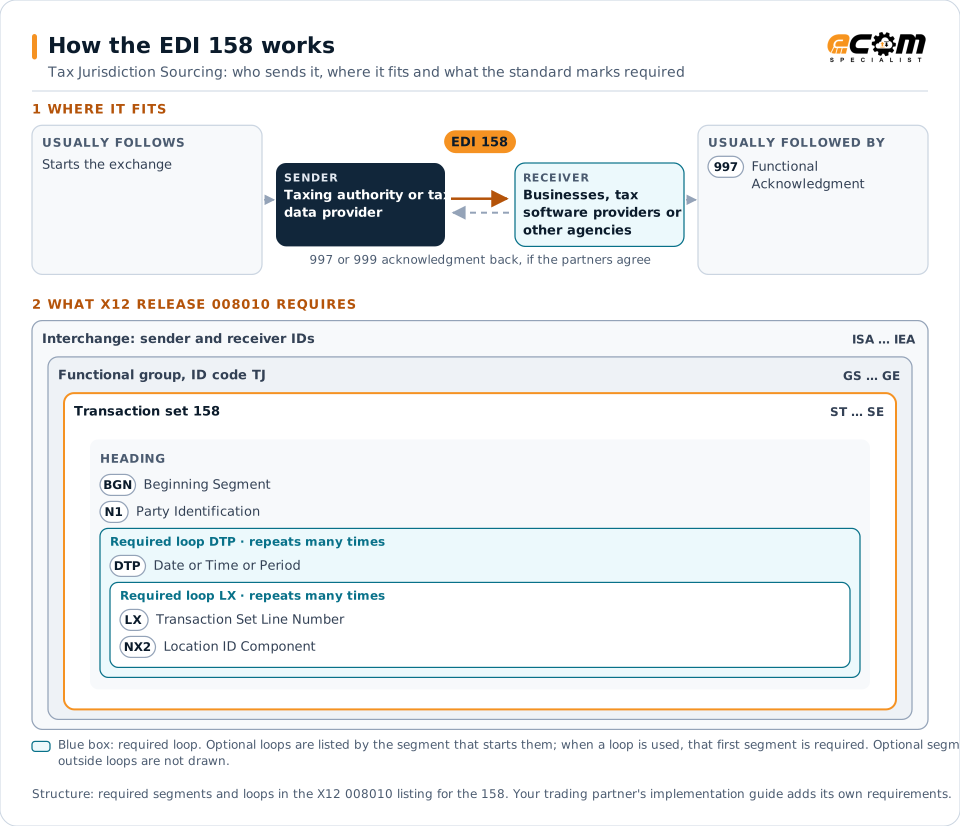
How to read this diagram: the top row shows who sends the 158, to whom, and which documents usually come before and after it. The lower part shows what X12 release 008010 itself requires: the envelopes around the 158 and the segments and loops the standard marks as required, area by area. Optional loops are listed by the segment that starts them rather than drawn in full. This is the standard's minimum, not a trading partner's requirement: each partner's implementation guide usually makes some optional loops mandatory, restricts the codes and may use a different release.
When it is used
- Distributing address-to-jurisdiction data
- Updating jurisdiction boundaries
- Supporting tax engines in assigning jurisdictions
Where it fits in the document flow
Structure
Mandatory segments in the 158 (X12 release 008010)
The segments X12 release 008010 marks as mandatory at their level, in order. Segments inside optional loops are needed only when the loop is used. This is the standard's requirement, not your trading partner's: each partner's implementation guide names the release it uses, adds the optional segments it requires and restricts the values. The requirement status comes from one published X12 reference listing and has not been checked against a second source.
- ST
- BGN
- N1
- DTP
- LX
- NX2
- SE
Practical example
The 158 in practice
A city annexes neighboring land, moving several streets into its taxing jurisdiction. The state distributes updated sourcing data with the affected addresses and their jurisdiction codes. A retailer's tax engine loads the update so deliveries to those streets carry the city's tax from the effective date.
Implementation
Implementation considerations for the 158
- Load boundary changes before their effective dates.
- Combine sourcing data with rate data (150).
- Standardize addresses before jurisdiction lookup.
- Keep historical sourcing data for tax audits.
How ECOM helps
Automate the 158 with ECOM
Solution
Financial Document Automation
Automate invoices, remittances, payment files and bank statements from capture to posting.
Industry
Retail
Retail and eCommerce EDI for suppliers and retailers, from purchase order to payment, with compliance built in.
Solution
EDI Integration
Exchange X12 and EDIFACT documents with partners and integrate them directly with your ERP.
More general questions about EDI are answered in the EDI FAQ.
Related transactions
Related government and regulatory documents
Need help with the EDI 158?
ECOM maps, tests and monitors X12 documents for your trading partners and integrates them with your ERP.